
Implement a webhook server in C#
You can also implement a server in C#. If you use different ports you can have as many servers as you want running.In this example for Windows, the PC that the server runs on can be suspended, shutdown or restarted. It can also show a message box or be made to speak.
The device parameter that the server responds to is specified on the form along with the required port to use:
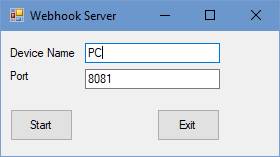
First set up the form and some constants and handle the close event.
public partial class Server : Form
{
    public Server()
    {
        InitializeComponent();
    }
    const int PHP_COM = 0;
    const int PHP_VAL = 1;
    const int PHP_KEY = 2;
    const int PHP_SUB = 3;
    const int PHP_DEV = 4;

    private void button1_Click(object sender, EventArgs e)
    {
        this.Close();
    }
The following functions is used to run commands from the Windows command line, so that the server can do something.
    public static void StartProcess(string PathAndFileName)
    {
        System.Diagnostics.Process.Start("CMD.exe", PathAndFileName);
    }
Start the server on a different thread than the UI to prevent the program hanging.
    Thread thread;
    private void button2_Click(object sender, EventArgs e)
    {
        thread = new Thread(StartListening);
        thread.Start();
    }
Initialise the speech object (available with the project download) and declare a string to store incoming data.
    Speech speech = new Speech();
    // Incoming data from the client.
    public string data = null;
Set up the server port and start listening, the port number is taken from the text box on the form and can be changed before starting the server.
public void StartListening()
    {
        // Data buffer for incoming data.
        byte[] bytes = new Byte[1024];

        // Establish the local endpoint for the socket.
        // Dns.GetHostName returns the name of the
        // host running the application.
        IPHostEntry ipHostInfo = Dns.GetHostEntry(Dns.GetHostName());
        IPAddress ipAddress = ipHostInfo.AddressList[1];
        IPEndPoint localEndPoint = new IPEndPoint(ipAddress, int.Parse(textBox2.Text));

        // Create a TCP/IP socket.
        Socket listener = new Socket(ipAddress.AddressFamily, SocketType.Stream, ProtocolType.Tcp);

        // Bind the socket to the local endpoint and
        // listen for incoming connections.
        try
        {
            listener.Bind(localEndPoint);
            listener.Listen(10);
Run a loop that listens on the socket and performs an action when something is receieved. The loop runs until the form is closed.
            // Start listening for connections.
            while (!IsClosing)
            {
                Console.WriteLine("Waiting for a connection...");
                // Program is suspended while waiting for an incoming connection.
                Socket handler = listener.Accept();
                data = null;
Data is received so get it as text and add it to the 'data' string.
                // An incoming connection needs to be processed.
                int bytesRec = handler.Receive(bytes);
                data += Encoding.ASCII.GetString(bytes, 0, bytesRec);
Split the parameters into the separate strings in an array so that it is easy to process.
Also initialise the return message 'Smsg' to the default value in case no command is found.
                // Show the data on the console.
                Console.WriteLine("Text received : {0}", data);
                String[] Args = data.Split(',');
                for (int s = 0; s < Args.Length; s++)
                {
                    Args[s] = Args[s].Replace("\0", String.Empty);
                }

                String Smsg = "Command Not Found";
Check if the command is for us then decode it and perform the required action.
                if (Args.Length >= 5)
                {
                    if (Args[PHP_DEV] == textBox1.Text) //check the device name
                    {
                        //check the command
                        switch (Args[PHP_COM])
                        {
                            case "msg":
                                //hangs website until ok clicked
                                MessageBox.Show(Args[PHP_VAL]);
                                Smsg = "Ok";
                                break;
                            case "alive":
                                //do nothing, just ok will be returned
                                Smsg = "I'm alive!";
                                break;
                            case "say":
                                speech.Say(Args[PHP_VAL], "0", "Microsoft Hazel Desktop");
                                Smsg = "Ok";
                                break;
                            case "inf":
                                //return available commands
                                if (Args[PHP_KEY] == "com")
                                {
                                    Smsg = "msg, alive, say, suspend, shutdown, restart";
                                }
                                break;
                            case "suspend":
                                Application.SetSuspendState(PowerState.Suspend, false, false);
                                Smsg = "Ok";
                                break;
                            case "shutdown":
                                StartProcess("/C shutdown -s -f -t 0");
                                Smsg = "Ok";
                                break;
                            case "restart":
                                StartProcess("/C shutdown -g -f -t 0");
                                Smsg = "Ok";
                                break;
                            default:
                                Smsg = "Fail - Command not recognised";
                                break;
                        }
                    }
                }
                else
                {
                    Smsg = "Fail";
                }
Send a message back to the client and close the socket.
                // Echo back to the client
                byte[] msg = Encoding.ASCII.GetBytes(Smsg);
                handler.Send(msg);

                handler.Shutdown(SocketShutdown.Both);
                handler.Close();
            }
        }
If something went wrong show the exception in the console window.
        catch (Exception e)
        {
            Console.WriteLine(e.ToString());
        }
    }
Set a flag when closing to allow us to exit the continuous loop.
    Boolean IsClosing = false;
    private void Form1_FormClosing(object sender, FormClosingEventArgs e)
    {
        IsClosing = true;
        Environment.Exit(Environment.ExitCode);
    }
}